The best Site24x7 alternative depends on what you actually use it for. If you mostly need to know whether a website, API or cron job is down, and you want to be paged only for real failures, a focused uptime tool will serve you better than a full observability suite. We built Uptime Beacon for that job. If you need APM, logs and infrastructure metrics in one place, you are comparing platforms like Datadog and New Relic instead. This guide covers both groups and says where each fits.
TL;DR
- Site24x7 is a broad platform. Its credit-based, à-la-carte pricing can make the monthly bill hard to predict, which is a common reason teams look elsewhere.
- For pure uptime, focused tools such as Uptime Beacon, UptimeRobot, Better Stack, Pingdom and StatusCake cover the checks most teams need with simpler plans.
- Uptime Beacon opens an incident only after several failures in a row, confirmed from a second location on paid plans, so fewer pages wake you for a network blip.
- Every Uptime Beacon plan, Free included, has an MCP server for AI assistants, and all results are stored in the EU.
- Full-stack platforms (Datadog, New Relic, Dynatrace, Grafana Cloud) make sense only if you need APM and logs in the same tool.
Table of Contents
- Why teams leave Site24x7
- Two kinds of alternatives
- Side-by-side comparison
- Uptime Beacon: fewer false alarms, then AI, then EU data
- The other focused tools, and where each fits
- Full-stack platforms: when you really need them
- How to choose
- Switching from Site24x7 without gaps
- Perspective
- Try Uptime Beacon free
- FAQ
- Sources
Why teams leave Site24x7
Site24x7 is a well-known monitoring platform covering websites, servers, networks and applications. That breadth is its strength, and for many teams it is also the reason to look around.
Three reasons come up most often when engineers compare options:
- Scope you do not use. If you only need to know that a login page, an API or a scheduled job is alive, a suite with infrastructure, APM and log modules adds menus, configuration and cost you never touch.
- Pricing that is hard to forecast. A review of website monitoring tools notes that Site24x7’s credit-based, à-la-carte pricing and overlapping product lines can make the true monthly total difficult to predict. Check the vendor’s own pricing page for current figures before you budget.
- Alert noise. Any tool that pages on the first failed check teaches your team to ignore pages. This is the problem we care about most, and it is the first thing to evaluate in any replacement.
A fourth reason is rising for European teams: where monitoring data is stored. We come back to that near the end, because it should decide the shortlist only if your compliance requirements say so.
Two kinds of alternatives
Before comparing names, sort them into two groups. Website monitoring checks from the outside whether a site and its services are reachable, fast and working. Full-stack platforms such as Datadog also cover infrastructure, APM and logs, with more complexity and less predictable pricing.
Focused uptime monitors: Uptime Beacon, UptimeRobot, Better Stack, Pingdom, StatusCake, Hyperping, Pulsetic, and self-hosted Uptime Kuma. Checkly is aimed at teams that want checks written as code.
Full-stack observability: Datadog, New Relic, Dynatrace, Grafana Cloud, Elastic.
If you are replacing Site24x7 mainly for its website and API checks, start in the first group. If you are replacing it because you want deeper tracing and log analysis, go to the second.
Side-by-side comparison
Prices below are the figures we could confirm. Vendors change plans often, so treat third-party numbers as a guide and confirm on each vendor’s pricing page.
| Tool | Best for | Free plan | Paid pricing we could confirm |
|---|---|---|---|
| Uptime Beacon | On-call engineers who want fewer false alarms, AI assistant access, EU data | 5 monitors, 5-minute interval, EU Central, one alert channel, one status page | Starter 14.99 EUR/month, Pro 39.99 EUR/month, Business 89.99 EUR/month, Enterprise on request |
| UptimeRobot | Many cheap monitors | 50 monitors at 5-minute intervals | Pro $7/month (1-minute), Team $29/month (30-second), per the same guide |
| Better Stack | Uptime plus on-call and logs in one product | 10 monitors, 3-minute intervals | Starter about $25/month, Plus about $85/month, per APIScout |
| RapidSpike | Synthetic monitoring for larger sites | Free tier listed | Plans from £199/month per Inferse |
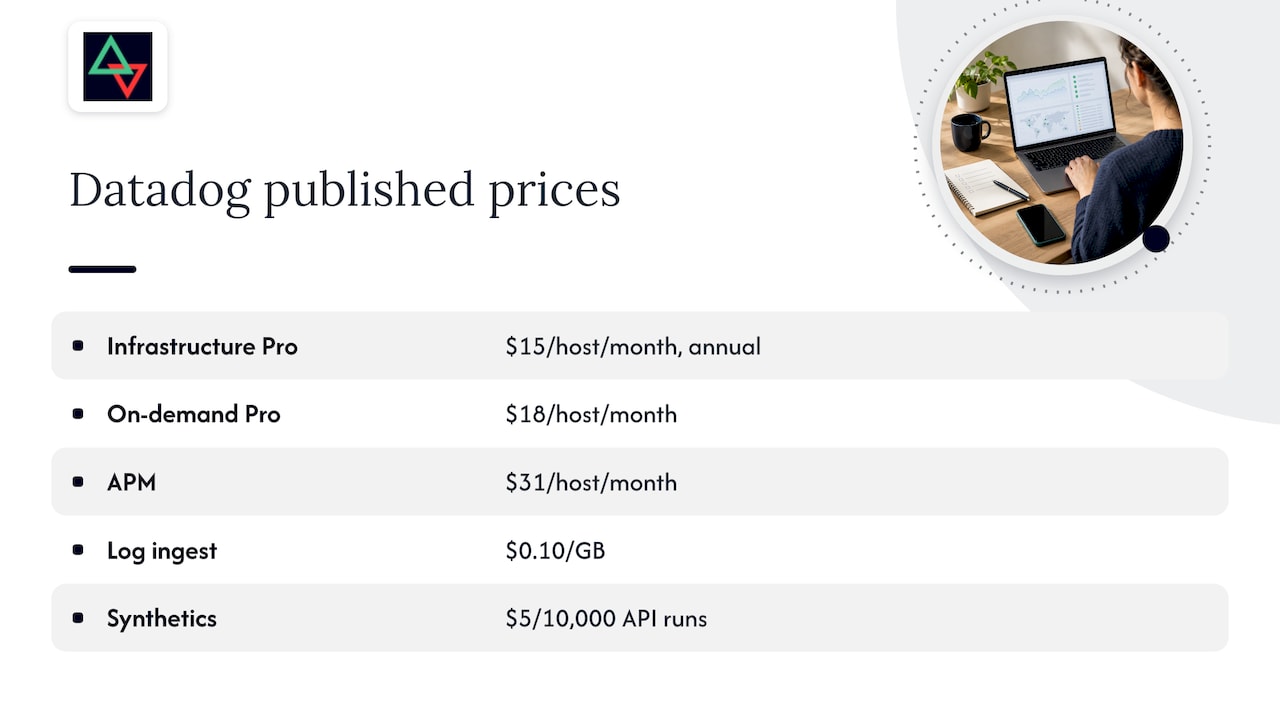
| Datadog | Full-stack observability | None listed | Infrastructure Pro $15 per host per month on annual contract, per tech-insider.org |
Pingdom, StatusCake, Pulsetic, Hyperping and Uptime Kuma are also worth a look. We have not listed their prices here because we could not confirm current figures. Their pricing pages are the place to check.
Uptime Beacon: fewer false alarms, then AI, then EU data
We are the client of this article’s publisher, so read this section as our own description of what we do. Here is what the product is designed for.
Alerts that wait for confirmation
Uptime Beacon checks HTTP endpoints, TCP ports and hosts from five regions: EU Central, EU North, US East, US West and Asia Pacific. An incident opens only after several failures in a row, and on paid plans a second location must confirm the failure. The goal is simple: the person on call is not woken up because one probe hit a congested route.

If you want to tune this for your own services, our uptime monitoring guide walks through setup without false alarms, and the piece on SaaS uptime monitoring covers paging only for real failures.
AI assistants over MCP on every plan
Every plan, including Free, includes an MCP server at https://app.uptimebeacon.eu/mcp. Connect Claude, ChatGPT, Cursor, VS Code, Codex or any MCP client, sign in, and there is no API key to manage. The assistant can read your monitors, incidents and check history, and diagnose a failing monitor region by region.
If you turn on “Allow changes” for a team, the assistant can also create, pause and resume monitors, acknowledge incidents and start maintenance windows. Nothing can be deleted over MCP. For developers who already work inside an AI coding assistant, this means asking “why is the checkout monitor failing from US West?” without opening a dashboard.
Everything else a small team needs
- Heartbeat monitoring for cron jobs and background workers.
- Certificate and domain expiry watches. Our domain expiry guide explains why to start alerting 45 days early.
- Public status pages that do not depend on the dashboard, so they stay available during an incident.
- Maintenance windows on Starter and above.
- Email, Slack and webhook alerting.
Pricing
Free is 0 EUR per month with no card: 5 monitors every 5 minutes from EU Central, one alert channel (email or Slack) and one status page. Starter is 14.99 EUR per month, Pro 39.99 EUR and Business 89.99 EUR. Enterprise has no published price. Add-ons start from 5 EUR per month: 10 more monitors on Starter cost 5 EUR, 50 more on Pro cost 10 EUR, 100 more on Business cost 15 EUR, and 10 more certificate or domain expiry watches cost 5 EUR. Every add-on has a fixed price you can read before you buy, so the total is easy to forecast.
The other focused tools, and where each fits
UptimeRobot
UptimeRobot is described by APIScout as the most popular free uptime service, used by over two million people. It offers HTTP, HTTPS, ping, port and keyword monitoring. It suits people with a long list of simple sites to watch, such as a freelancer with many small client pages. If your pain is paging noise on production services, compare how each tool confirms a failure before it alerts.
Better Stack
Better Stack, formerly Better Uptime, pairs uptime checks with on-call scheduling, escalation policies, status pages and log management. APIScout reports checks from 10+ regions with 30-second intervals on paid plans. It is a fit for teams that want incident response and logs bundled with uptime.
Pingdom, StatusCake and the rest
Pingdom and StatusCake are long-standing options for website checks, and Pulsetic and Hyperping are newer names often listed in roundups of Site24x7 alternatives. Uptime Kuma is open source and self-hosted: you run it yourself, which means you also own its uptime and its alerting path. Checkly suits teams that prefer browser and API checks defined in code. Read the current feature and pricing pages for each before deciding.
Full-stack platforms: when you really need them
If you want traces, logs and infrastructure metrics next to uptime, Datadog, New Relic, Dynatrace and Grafana Cloud are the usual candidates. They also bill very differently. According to a tech-insider.org analysis, Datadog and Dynatrace bill per host plus data, New Relic per gigabyte plus per user, and Grafana Cloud by active series, gigabytes and active users.
Datadog’s published figures from that analysis, read from the vendor’s pricing page on October 31, 2026, include $15 per host per month for Infrastructure Pro on an annual contract ($18 on demand), $31 per host per month for APM, $0.10 per GB for log ingest and $5 per 10,000 API runs for Synthetics. No free tier is listed.
Those are different jobs from uptime monitoring. Many teams run a focused uptime tool alongside an observability platform, so that the outside-in view of “is it reachable” does not depend on the same system that is being measured.
How to choose
Use these criteria in order.
- Alert quality. Ask how many consecutive failures open an incident and whether another location confirms. This decides how often you are woken up.
- Fit for your workloads. Cron jobs and background workers need heartbeat monitoring, not just HTTP checks. APIs need response checks. See our guide to API uptime monitoring for what to check and how to alert.
- Status page resilience. A status page hosted on the same dashboard as the monitoring tool can fail with it. Ours does not depend on the dashboard.
- Predictable cost. Fixed plan prices and fixed add-ons are easier to budget than credits or per-host metering.
- Workflow. If your engineers live in Cursor, Claude or VS Code, MCP access to monitor data saves context switches.
- Data location. If your contracts or GDPR assessment require EU storage, confirm where each vendor stores check results. Ours are stored on a control plane and database in the EU.
Matching the tool to who you are
- Solo developers and indie founders: a free plan with a real alert channel and a status page is enough to start. Ours gives you 5 monitors, one channel and one status page for 0 EUR.
- Small SaaS teams and on-call engineers: alert confirmation and heartbeats matter most. See our SaaS use case.
- Agencies and freelancers: many sites, several clients, status pages to share. See our agency use case.
- Teams that need tracing and logs: a full-stack platform, possibly alongside a focused uptime tool.
Switching from Site24x7 without gaps
- List what you monitor today: URLs, APIs, ports, certificates, domains and any cron checks.
- Recreate the most critical monitors first and run both tools side by side for a week or two.
- Move alert channels over and compare what pages each tool would have sent.
- Rebuild your status page and point your team to the new link.
- Retire the old checks once the new ones have proven quiet and accurate.
When you diagnose an outage during the overlap, the website downtime diagnosis guide helps you find the cause quickly.
Perspective
We have run production in banking, fintech, telecom and SaaS, and the lesson that repeats is that monitoring fails people in two ways: it stays silent when something is broken, or it shouts when nothing is. The second failure is quieter and does more damage, because a team that stops trusting its pager stops answering it.
That is why we confirm before we alert. Several failures in a row, and on paid plans a second location, is a deliberate design choice. We would rather your engineer sleep through a blip than learn to ignore us.
We also think monitoring should meet engineers where they work. An assistant that can read your monitors and walk through a failing check region by region is a faster first responder than a dashboard at 3 a.m., and we give it to every plan, with changes off until a team allows them and deletion never possible.
Suites like Site24x7 have a place for teams that want everything in one product. Most small teams we talk to need less: a few honest checks, calm alerts and a status page that survives the outage.
Aaditya Parashar
Try Uptime Beacon free
If your shortlist is about reliable uptime checks without the noise, start with the Free plan on Uptime Beacon: 5 monitors, a 5-minute interval from EU Central, one alert channel and one status page, no card. When you need more regions, confirmation from a second location, maintenance windows or more monitors, Starter begins at 14.99 EUR per month.
Online shops can see how the same checks apply to checkout and storefront on our e-commerce page.
FAQ
What is the best free alternative to Site24x7?
It depends on what you value. UptimeRobot is known for its 50 free monitors at 5-minute intervals. Uptime Beacon’s Free plan gives 5 monitors with one alert channel, one status page and MCP access for AI assistants, with no card needed. Pick by whether you need many monitors or calmer alerts and AI tooling.
Is Site24x7 an observability platform or an uptime monitor?
Both, which is the point of comparison. It covers websites, infrastructure and applications, so it overlaps with platforms like Datadog as well as with focused uptime tools. If you only need outside-in checks, a focused monitor is usually simpler.
Can I use an AI assistant to manage my uptime monitors?
With Uptime Beacon, yes. Connect Claude, ChatGPT, Cursor, VS Code, Codex or any MCP client to the MCP endpoint and sign in. The assistant can read monitors, incidents and check history. With “Allow changes” on, it can also create, pause and resume monitors, acknowledge incidents and start maintenance windows, but never delete anything.
Does Uptime Beacon store data in the EU?
Yes. Every result is stored on a control plane and database in the EU. Uptime Beacon is operated by Wealth Beacon OÜ in Estonia. Checks run from five regions, including the US and Asia Pacific, so choose regions to match your own requirements.
How do I avoid false alarms when I switch tools?
Require several consecutive failures before an incident opens and have another location confirm. Uptime Beacon does this by design on paid plans. Our monitoring best practices guide covers thresholds and health-check design.
Sources
- 12 Best Website Monitoring Tools in 2026 (+ Open Source)
- Best API Monitoring and Uptime Services in 2026, APIScout
- Best Synthetic Monitoring in 2026, Inferse
- Datadog Pricing vs 4 Rivals, tech-insider.org


